Quick Start
Prerequisites
- Node.js v18 or higher
- A Hedera-compatible wallet (HashPack, MetaMask, or any WalletConnect-compatible wallet)
- A Hedera Testnet Account (if running in dev mode)
Installation
cd stablecoin-studio/apps/web
npm install
Configuration (.env)
Copy the example file and edit it before starting the app:
cp .env.sample .env
All values are JSON arrays so you can configure multiple environments.
Required
| Variable | Description |
|---|---|
REACT_APP_FACTORIES | Factory addresses per environment (see Deployed Addresses). Format: [{"Environment":"testnet","STABLE_COIN_FACTORY_ADDRESS":"0.0.xxxxx"}] |
REACT_APP_RESOLVERS | Resolver addresses per environment (see Deployed Addresses). Format: [{"Environment":"testnet","STABLE_COIN_RESOLVER_ADDRESS":"0.0.xxxxx"}] |
REACT_APP_MIRROR_NODE | Mirror node configuration (see Hedera Mirror Nodes). If no API key is needed, leave API_KEY and HEADER empty. Format: [{"Environment":"testnet","BASE_URL":"https://testnet.mirrornode.hedera.com","API_KEY":"","HEADER":""}] |
REACT_APP_RPC_NODE | RPC node configuration (see Hedera JSON-RPC Relay). Same format as mirror node. |
General
| Variable | Description | Default |
|---|---|---|
REACT_APP_LOG_LEVEL | Log level: ERROR, WARN, INFO, HTTP, VERBOSE, DEBUG, SILLY | ERROR |
REACT_APP_SHOW_CONFIG | Show configuration panel in the UI | true |
GENERATE_SOURCEMAP | Generate source maps for debugging | false |
Backend (optional, for Multi-Signature)
Only needed if you use multi-signature transaction support. See Backend Quick Start.
| Variable | Description |
|---|---|
REACT_APP_BACKEND_URL | URL where the Backend service is running (e.g., http://localhost:3001) |
Consensus Nodes
| Variable | Description |
|---|---|
REACT_APP_CONSENSUS_NODES | Consensus node addresses (see Hedera Nodes). Format: [{"Environment":"testnet","CONSENSUS_NODES":[{"ID":"0.0.3","ADDRESS":"34.94.106.61:50211"}]}] |
Hedera Wallet Connect 2.0
Required for wallet connections via Hedera WalletConnect. Create a project in the WalletConnect Cloud to get a project ID. HWC 2.0 supports both native Hedera accounts and EVM accounts (MetaMask).
| Variable | Description | Default |
|---|---|---|
REACT_APP_PROJECT_ID | WalletConnect Cloud project ID | required |
REACT_APP_DAPP_NAME | Display name shown in the wallet pairing dialog | Hedera Stablecoin |
REACT_APP_DAPP_DESCRIPTION | DApp description shown during wallet pairing | StableCoin is a decentralized stablecoin platform built on Hedera Hashgraph. |
REACT_APP_DAPP_URL | DApp URL used for WalletConnect metadata | https://wc.hgraph.app/ |
REACT_APP_DAPP_ICONS | JSON array of icon URLs displayed in the wallet | (Hedera logos) |
Note: Multi-signature operations are only supported when connected with a native Hedera wallet. EVM wallets (MetaMask) do not support multisig signing.
Theme & Branding
- Colors: Defined in
tailwind.config.jsor main CSS variables - Logos: Replace assets in
public/assets/imagesto white-label the application
Run
npm run start
Open http://localhost:3000 to view it in the browser.
Connect Your Wallet
On first load, select your wallet provider to connect:
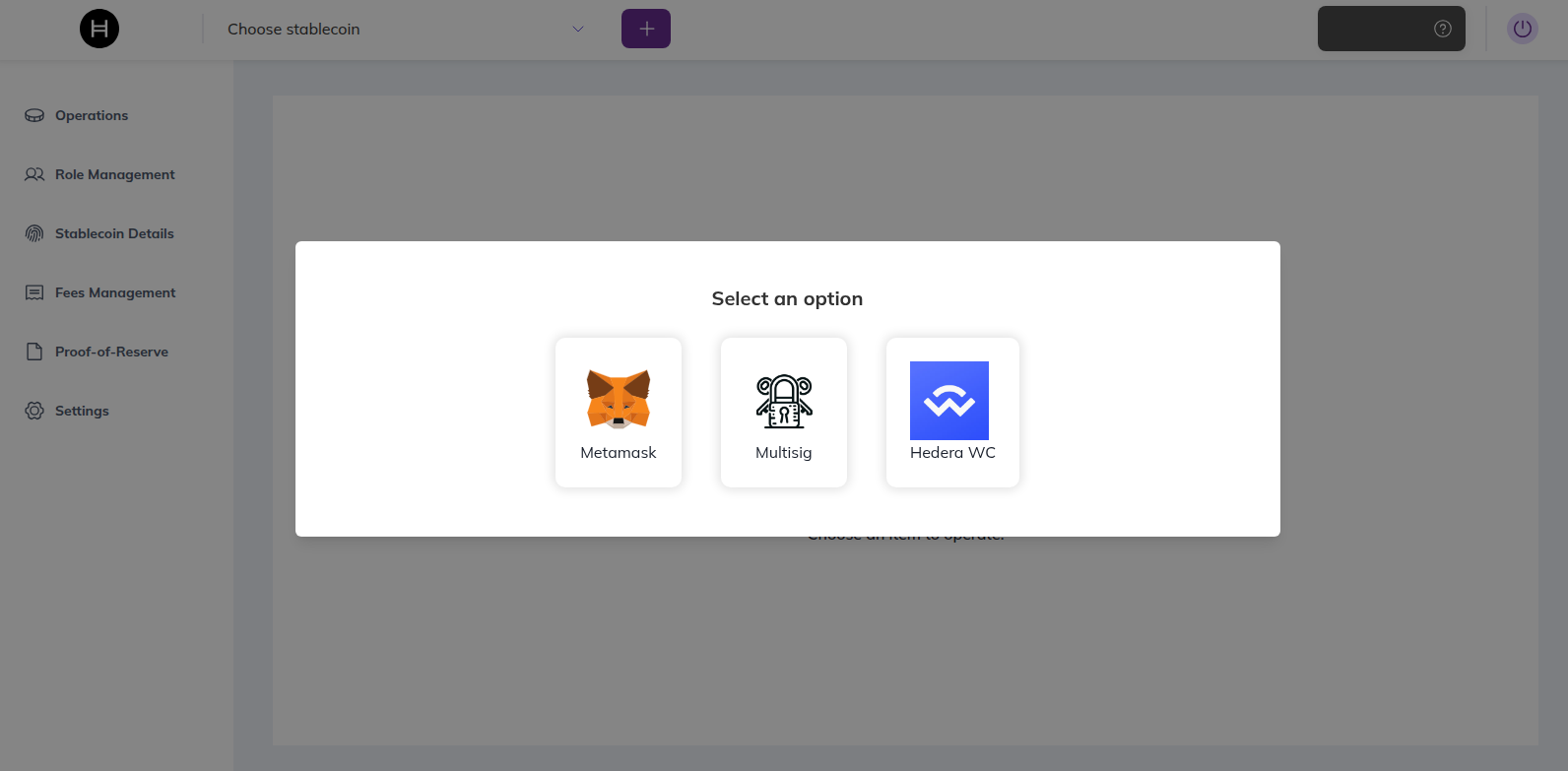
Supported options: MetaMask, Multisig (native Hedera wallets only), and Hedera WalletConnect 2.0.